Introduction
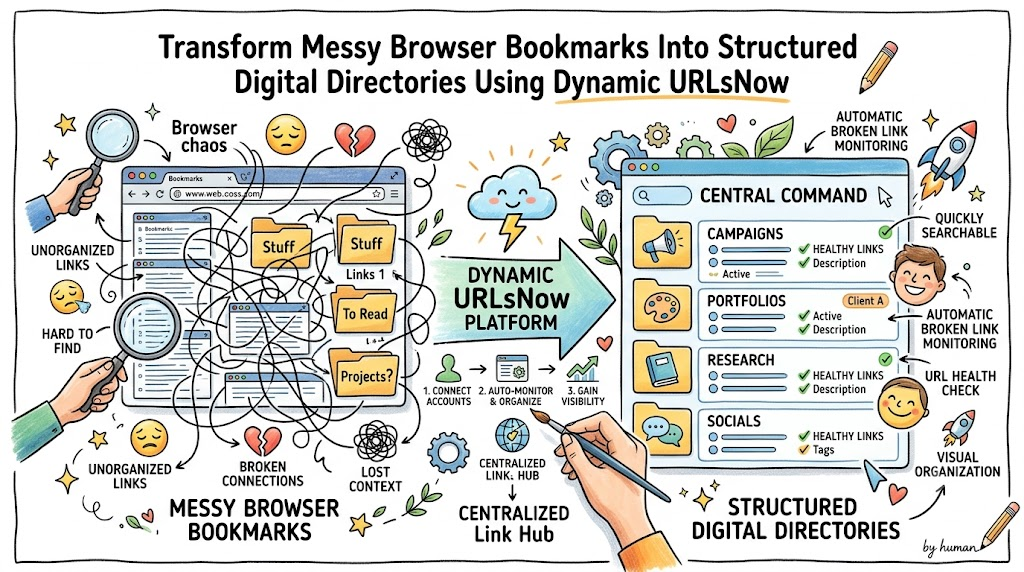
Online productivity breaks down when scattered resources force professionals to spend hours searching for critical web addresses. Content creators, growth marketers, and digital teams frequently store valuable landing pages across chaotic text files, temporary chat threads, and device-locked browser menus. This fragmented habit obscures important assets and exposes audiences to dead landing pages during active marketing campaigns. Transitioning toward a dedicated URL management tool like URLsNow equips individuals and organizations with a unified command center that categorizes resources, monitors link health, and streamlines sharing across every channel.
What is a URL Management Tool?
A specialized address management system serves as a cloud-hosted workspace that catalogs, tests, and shares web locations through a single interface. Legacy browser bookmarking features fail modern web users because they isolate data on specific devices and lack real-time status tracking. In contrast, an advanced link management platform converts chaotic collections of links into an organized, searchable catalog that automatically verifies server connectivity. Through smart folder structures, customizable tags, and continuous uptime audits, these systems ensure every saved resource remains accessible and fully functional.
Why Managing Many URLs Becomes Difficult
Expanding digital operations naturally creates file chaos, operational delays, and lost revenue opportunities across daily workflows. As teams launch promotional campaigns, produce content, and conduct online research, finding specific destination links requires tedious manual searches through static documents. Unmonitored web addresses quietly go offline, hurting search engine rankings, eroding consumer trust, and wasting advertising budgets on dead pages. Depending on memory or unmonitored text files inevitably causes duplicate work, version conflicts, and costly communication breakdowns.
What is URLsNow?
URLsNow functions as a complete digital command center that simplifies how businesses and creators manage their online address repositories. The service bridges the gap between chaotic saving habits and structured asset management by providing smart folder categorization, dynamic link checks, and customizable public showcases. Users store all their critical web locations inside one clean, intuitive interface rather than juggling dozens of open tabs or offline notes. The system handles routine background link testing automatically while giving users complete control over how they organize and present their digital ecosystem.
Key URLsNow Features Explained Through Real Problems
URL Management Tool
Problem: Storing web locations across separate devices and disconnected note applications creates friction whenever you need immediate access.
Why it matters: Searching through unorganized lists wastes productive time and disrupts concentration during time-sensitive tasks.
How URLsNow helps: It unifies every web link into a single, cloud-hosted dashboard that you can search and access from any web browser.
Practical benefit: You retrieve any saved asset in seconds, preserving focus and keeping your daily projects moving forward.
URL Organizer Tool
Problem: Flat, unorganized lists turn large catalogs of web addresses into unreadable blocks of text.
Why it matters: Without clear categories, team members waste valuable hours scrolling through irrelevant links to find project resources.
How URLsNow helps: Its responsive URL organizer tool allows you to structure web locations into custom folder trees, project groups, and tag networks.
Practical benefit: You maintain clean, intuitive digital workspaces that keep your team organized and your projects on schedule.
Automatic Broken Link Monitoring
Problem: Website updates, domain expirations, and server reconfigurations silently break web addresses over time.
Why it matters: Directing clients, readers, or ad traffic to dead pages hurts your professional credibility and lowers conversion rates.
How URLsNow helps: The system executes automatic broken link monitoring continuously, highlighting offline or missing web pages right away.
Practical benefit: You repair dead links immediately, protecting your brand reputation long before site visitors discover an error.
URL Health Monitoring Tool
Problem: Slow server responses, unexpected HTTP errors, and multi-step redirect loops degrade user experience without taking pages entirely offline.
Why it matters: Poorly performing destination pages lower ad efficiency, frustrate potential buyers, and hurt search engine rankings.
How URLsNow helps: The built-in URL health monitoring tool tracks destination server speeds, status codes, and redirection paths around the clock.
Practical benefit: You ensure high performance across your web properties by verifying that every destination loads quickly and correctly.
Campaign Link Management Tool
Problem: Launching marketing campaigns across email newsletters, social channels, and affiliate networks creates hundreds of tracking links.
Why it matters: Unorganized tracking URLs lead to missing campaign data, broken destination pages, and inaccurate performance reports.
How URLsNow helps: It functions as a specialized campaign link management tool, organizing tracking parameters and landing pages inside isolated campaign hubs.
Practical benefit: Marketers run precise promotional campaigns, protect ad spend, and audit tracking tags with total confidence.
Link Portfolio Management
Problem: Independent freelancers struggle to present published articles, client work, and design samples cleanly through standard email text.
Why it matters: Sending long lists of raw text links looks unpolished and reduces the likelihood that potential clients review your work.
How URLsNow helps: Through link portfolio management, professionals build interactive showcases that display work samples in clean, categorized galleries.
Practical benefit: You impress prospective clients with a sleek presentation that highlights your best achievements clearly.
Free Link in Bio Tool
Problem: Social media platforms restrict account bio sections to a single external website location.
Why it matters: A single link limits your ability to direct social traffic toward new articles, online storefronts, and secondary channels simultaneously.
How URLsNow helps: It delivers a free link in bio tool that generates a fast-loading landing page housing all your primary digital destinations.
Practical benefit: You maximize social media conversion rates by offering followers an easy gateway to all your top content.
Content Link Management Tool
Problem: Digital publishing teams manage thousands of external source citations and internal article links across extensive site archives.
Why it matters: Broken external sources and missing internal links erode reader trust, lower search rankings, and damage affiliate revenue.
How URLsNow helps: The multi-featured content link management tool gives editorial teams the power to catalog, audit, and update published links systematically.
Practical benefit: You preserve editorial authority, protect affiliate streams, and maintain top publishing quality across every article you release.
Digital Footprint Management Tool
Problem: Growing brands lose track of active public profiles, legacy domain names, and external brand mentions over years of expansion.
Why it matters: Forgotten web assets display outdated business details to prospective buyers and create unmonitored security risks.
How URLsNow helps: Serving as a digital footprint management tool, the platform registers and tracks every active web presence connected to your organization.
Practical benefit: You secure your public identity, maintaining absolute consistency and brand accuracy across every online channel.
Who Can Benefit from URLsNow?
- Digital Agencies & Marketers: Organize active campaign URLs, affiliate destinations, and client landing pages inside secure, structured workspaces.
- Content Creators & Social Influencers: Build dynamic bio link pages, organize media kits, and guide social followers directly to your best platforms.
- Bloggers & Publishing Teams: Catalog research sources, check external citations for broken paths, and maintain clean internal site linking structures.
- Freelancers & Consultants: Construct elegant portfolio pages that display client case studies, creative assets, and work samples smoothly.
- Developers & System Administrators: Group staging environments, active API endpoints, system tools, and documentation pages into searchable team directories.
- Everyday Web Explorers: Replace restrictive browser bookmarks with a cloud-accessible link hub that keeps personal interests neatly organized.
Real-Life Ways People Can Use URLsNow
Picture a fast-moving marketing team running a seasonal campaign across several advertising networks. Rather than sharing destination links through messy chat threads or static text files, the team stores every tracking URL inside a shared workspace. Real-time background monitoring alerts the team immediately if a destination server fails during a flash sale, allowing instant fixes that preserve revenue and ad spend.
Another scenario demonstrates a freelance journalist sending project proposals to prospective magazine editors. Instead of attaching long text lists of past work, the writer shares a custom showcase page sorted cleanly by topic, such as technology, business, and profile pieces. Editors navigate the organized gallery effortlessly, appreciate the professional presentation, and approve new writing assignments faster.
Consider a university instructor managing online course materials for hundreds of remote students. The educator compiles reading assignments, lecture slides, and video tutorials into a single public directory. Students access every course resource through one permanent link, while automatic status checks notify the instructor whenever external reading links change location or drop offline.
Step-by-Step Guide to Organize Your URLs
Step 1
Identify the URLs you need to manage. Audit your active web usage by gathering links saved across browser histories, chat logs, offline notes, and static spreadsheets into one master starting list.
Step 2
Group URLs by purpose. Divide your collected addresses based on their main function, separating personal research and reading lists from client deliverables and active promotional pages.
Step 3
Create categories or collections. Build custom folders or tag networks inside your central hub, applying clear titles like “Active Campaigns,” “Client Portfolios,” or “Reference Reading.”
Step 4
Remove duplicates and outdated resources. Clear out redundant web addresses, expired landing pages, and dead destinations to keep your primary database lean and responsive.
Step 5
Monitor important links for availability. Activate automated background checks on mission-critical destinations like checkout pages, lead forms, and client portfolios to catch downtime fast.
Step 6
Review redirects and problematic URLs. Inspect flagged addresses showing sluggish response times or complex redirect chains, updating destination paths immediately to ensure smooth access.
Step 7
Create a public link collection when needed. Compile selected web assets into a shareable public hub whenever you need to present resources to team members, clients, or social followers.
Step 8
Review and maintain your URL portfolio regularly. Set aside periodic time to archive finished project links, tag newly saved destinations, and adjust folder groups as your work expands.
Common URL Management Mistakes to Avoid
Relying exclusively on local browser bookmarks restricts your operational flexibility because stored links remain trapped on specific hardware devices. This outdated method prevents quick access when switching computers and offers zero automated tools to catch dead web pages.
Storing every saved web location inside a single uncategorized folder creates massive digital clutter that slows down your workday. Without tag systems or folder structures, finding a specific link forces you to read through hundreds of unrelated entries manually.
Ignoring destination uptime monitoring leads straight to bad user experiences, lost sales, and damaged search rankings. Assuming saved landing pages or affiliate destinations remain functional forever leaves your audience stranded whenever external site owners alter their link structures.
Distributing static spreadsheets across remote teams generates version conflicts, accidental deletions, and broken communication. Multiple team members editing unmonitored lists inevitably cause outdated tracking links and mass confusion during active campaigns.
URLsNow vs Traditional URL Management
Traditional URL Management vs Centralized URL Management
| Vector | Traditional URL Management | Centralized URL Management (URLsNow) |
| Organization | Scattered local bookmarks and text files | Unified, cloud-hosted hub with custom tags |
| Searchability | Slow manual scrolling through browser lists | Instant multi-keyword search and tag filtering |
| Monitoring | Non-existent; requires clicking links manually | Automated continuous server checks and alerts |
| Broken Link Detection | Unnoticed until visitors encounter error pages | Immediate automated notifications for offline pages |
| Campaign Management | Unorganized spreadsheets prone to editing errors | Structured campaign hubs designed for tracking |
| Portfolio Management | Raw lists of text links pasted into plain emails | Interactive, polished galleries for public viewing |
| Public Sharing | Difficult; requires sending long lists of links | Single shareable link hosting dynamic collections |
| Maintenance | High manual effort and constant missing links | Automated system checks with effortless reviews |
URLsNow Features and Practical Benefits
URLsNow Features vs Practical Use
| Feature | What It Does | Who Can Benefit |
| URL Management | Unifies all digital destinations into a searchable online workspace | Remote teams, agencies, and online workers |
| URL Organizer | Categorizes web addresses into custom folders, tags, and groups | Project managers, researchers, and students |
| Broken Link Monitoring | Scans saved links automatically to catch offline or missing pages | Website managers, store owners, and SEO teams |
| URL Health Monitoring | Tracks server response speed, HTTP errors, and redirect loops | Developers, IT administrators, and ad managers |
| Campaign Link Management | Stores and organizes marketing URLs and campaign tracking codes | Growth marketers, media buyers, and agencies |
| Link Portfolio Management | Transforms raw link collections into sleek public showcases | Freelancers, consultants, and creative workers |
| Link in Bio | Displays multiple destination links on a single mobile-friendly page | Social media managers, influencers, and creators |
| Content Link Management | Audits external citations and internal article links across sites | Bloggers, editors, and publishing teams |
| Digital Footprint Management | Catalogues and monitors public brand assets across the entire web | Entrepreneurs, executives, and public figures |
Key Benefits
- Time Savings: Centralize every link in a searchable web system so you never waste time searching for misplaced resources.
- Flawless User Experience: Automated health checks alert you to broken links before prospective customers or search engines discover them.
- Seamless Team Collaboration: Share structured collections with clients and colleagues using clean, professional link hubs.
- Higher Marketing Returns: Keep campaign tracking links organized to ensure paid ad traffic lands on active, high-converting pages.
- Polished Professional Image: Display your work through customizable portfolio pages that leave lasting impressions on prospects.
- Scalable Asset Control: Expand your web presence with confidence, knowing your organization system grows alongside your digital footprint.
FAQ Section
1. What distinct advantages does cloud address management offer over traditional browser bookmarks?
Cloud managers sync your saved web locations across all hardware devices, running automated background checks and providing flexible tag filters that browser menus lack.
2. How do automated status checks safeguard online ad budgets?
Automated scanning tests landing pages continuously, sending immediate alerts if a target server drops offline so marketers can redirect paid traffic before burning budget.
3. Can team members edit shared link collections simultaneously?
Yes, centralized platforms let team members build and edit project directories together, keeping remote colleagues, freelancers, and clients aligned on identical resources.
4. What makes a structured link hub superior to static tracking spreadsheets?
Dedicated hubs organize tracking links logically, eliminate accidental editing errors, monitor destination uptime automatically, and prevent version conflicts across teams.
5. How does a custom bio link landing page boost social media engagement?
It transforms your single allowed bio link into an interactive gateway displaying multiple essential destinations, guiding social followers straight to your latest content or store.
6. Is it possible to organize thousands of saved links without slowing down search speed?
Yes, cloud-based address tools leverage database indexing and fast tag filters, allowing you to locate specific web addresses in seconds regardless of collection size.
7. Why should publishing teams monitor outbound citation links regularly?
Auditing external citations stops readers from landing on dead reference pages, which preserves editorial credibility, maintains site authority, and protects affiliate revenue.
8. How do interactive portfolio showcases help freelancers attract higher-paying clients?
Showcases transform plain lists of web links into visual, professional galleries that allow prospective clients to evaluate skills and past work samples instantly.
9. Why does centralizing digital footprint tracking matter for growing businesses?
Cataloging active domains, social channels, and public properties into one system gives executives complete visibility and control over their public online brand.
10. What happens when a target URL triggers a redirection loop or server error?
The health monitoring tool flags the bad status code or delay, notifying you of the performance drop so you can update target destinations immediately.
Final Thoughts
Gaining complete command over your online destinations is essential for building a fast, reliable, and professional web presence. Continuing to rely on device-locked browser bookmarks or static spreadsheets wastes valuable working hours and exposes your audience to frustrating dead pages. Unifying your web assets within a cloud-hosted environment streamlines daily workflows while ensuring every campaign, project, and reference link remains fully functional. Utilizing a comprehensive platform like URLsNow transforms link organization from a daily headache into a strategic advantage for your business or creative ventures. Upgrading your link management approach today establishes a strong, efficient foundation that supports all your future digital projects.
