Introduction
Modern automation needs ongoing maintenance, and RobotOps—short for Robotics Operations—provides that critical care. Standard programs sit quietly on distant computers, but physical machines push through warehouse traffic and carry heavy crates. Rough work floors grind down tires, coat sensor lenses with dirt, and loosen metal bolts. Support engineers must follow travel routes, install software patches, and fix mechanical snags right away. The educational resource RobotsOps.com shares simple guides on these vital practices for students and working professionals. Smart operational oversight keeps working machines dependable, quick, and safe during long production shifts.
What Is RobotOps?
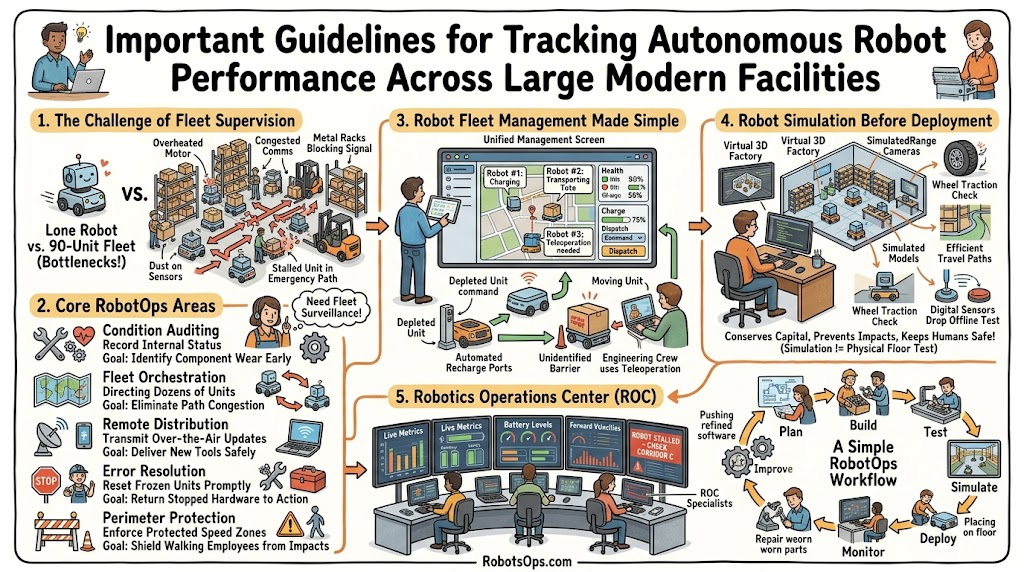
Specialists start by building metal frames and writing control programs. Next, operators roll these machines into busy facilities like assembly plants. Supervisors track live battery levels, camera feeds, and sensor signals from remote monitors. Crews broadcast software patches over Wi-Fi to add features or solve errors. Technicians clean lenses, replace worn drive belts, and grease mechanical joints. Floor teams coordinate entire machine groups so units never crash into each other. If a rover stops unexpectedly, support specialists find the problem and restart work quickly. Computer code lives on digital screens, but physical robots roll past walls, boxes, and workers. Because machines cause real physical risks, support teams enforce strict safety boundaries and continuous tracking routines.
Why RobotOps Matters
Supervising a lone helper cart takes little work because one person can follow its movements. In contrast, operating dozens of machines across an active plant creates tough bottlenecks. Carriers exhaust battery reserves during busy production runs. Wet floors cause rubber tires to spin, and airborne dust blurs camera views. Spotty network zones delay steering commands and freeze machines in place. When one cart halts, behind-schedule machines pile up and shut down whole travel lanes. Fast operational tracking tools catch minor problems before production lines stop. Consistent machine oversight keeps plant operations rolling smoothly.
RobotOps Areas
| RobotOps Area | Simple Meaning | Main Goal |
| Deployment | Putting robots into real workspace locations | Start working safely without long setup delays |
| Monitoring | Watching robot telemetry and machine health | Spot small errors before hardware breaks down |
| Maintenance | Fixing worn mechanical parts and batteries | Keep machines running in top physical condition |
| Fleet Control | Guiding many robots across shared floors | Avoid traffic jams and finish tasks fast |
| Remote Support | Controlling stuck machines from a computer screen | Clear pathway blocks without walking to the floor |
Robot Fleet Management Made Simple
Robot Fleet Management coordinates dozens of rolling machines through a single software screen. Technicians see whether units are rolling, idling, or plugging into charging stations. The software displays live positions on an interactive building blueprint. It watches power reserves so carts recharge before their batteries die completely. Dispatch systems hand delivery jobs to the nearest idle machine. The dashboard flashes bright warnings whenever a carrier stops unexpectedly. Technicians guide blocked carts using computer joysticks across the network. They also send software updates to the whole fleet at once to protect machine health.
| Single Robot Task | Fleet Management System |
| Runs one assigned path alone | Shares floor pathways with fifty machines |
| Needs manual checks in person | Sends alerts to one central dashboard |
| Uses local power warnings | Routes low-battery units to chargers automatically |
| Requires cable-based code updates | Updates all machines over the air |
Industrial Robotics and Robotics Automation
Mighty factory arms take on punishing jobs inside car assembly facilities. These steel limbs use powerful electric motors, fine sensors, and digital controllers to finish heavy physical tasks. They weld vehicle bodies, fasten steel plates, box packaged goods, and lift wooden pallets. Robotics automation helps these tools repeat detailed steps swiftly without growing tired. RobotOps software supervises these stationary tools after factory technicians mount them. Tracking programs monitor motor heat, joint shake, and light curtains day and night. When a joint warms up past safe limits, the program flags the risk before gears strip.
Real-World Robot Examples
| Robot Type | Common Work | RobotOps Need |
| Factory Arm | Welds car frames together | Monitors motor heat and joint positions |
| Warehouse Rover | Moves wooden pallets across floors | Maps clear routes and tracks battery life |
| Hospital Cart | Delivers clean medicine to rooms | Uses secure doors and avoids hallway crowds |
| Farm Drone | Checks field crops from above | Uploads flight telemetry and monitors wind drift |
Robotics Software and ROS 2
Smart software acts as an electronic nervous system that turns sensor inputs into wheel motions. Many engineers rely on ROS 2, an open framework called Robot Operating System 2. ROS 2 acts like a bridge that links separate robot components together. It organizes work into nodes, which are small software modules that run individual jobs. Nodes swap information through pathways called topics. For example, a camera node posts floor pictures to a topic, and a motor node reads those pictures to turn the wheels. ROS 2 also runs actions, which manage longer jobs like traveling across a warehouse. RobotOps tools check ROS 2 code inside virtual test setups before crews send updates to live machines.
Robot Simulation Before Real Deployment
Virtual simulation lets developers test navigation code inside digital 3D video game worlds. Programmers check steering rules, travel paths, and virtual sensor readings without touching physical hardware. They test difficult edge cases and catch bugs safely. If flawed software makes a digital rover crash, the vehicle hits a virtual wall without bending steel parts. Teams execute hundreds of virtual building runs every evening. Yet digital tests cannot reproduce every real-world problem. Actual factory floors have bright glare, oil spots, and rough concrete that computers cannot copy well. Developers use simulations for quick baseline checks, but they always finish their evaluations on physical plant concrete.
Autonomous Mobile Robots
Autonomous Mobile Robots, or AMRs, glide through modern facilities without human drivers. Inside distribution buildings, AMRs slide under loaded product racks, lift the weight, and deliver items to human workers. They use laser sensors called LiDAR to map open paths and dodge walking employees or fallen cartons. AMRs check their own battery gauges and drive to chargers when power runs down. RobotOps systems route new pick orders to the nearest idle rover. The platform tracks every moving unit to clear hallway jams and guarantee on-time material transport.
Robotics Operations Center
A Robotics Operations Center, or ROC, looks just like a busy airport control tower. Support workers watch wall-sized screens showing video streams, floor maps, and system performance dials. The ROC collects telemetry, which means live performance metrics like speed, battery voltage, and motor temperature. When a rover stops in an aisle, an operator spots the warning right away. The technician inspects the machine’s camera view, clears the stop flag, or steers the vehicle around the obstacle from afar. This shared view becomes vital as companies expand from a few test carts to large fleets spread across multiple distribution sites.
Real-Life Scenarios / Experiences
- A loose shipping crate slid off a shelf and blocked a stockroom aisle, trapping three rolling carriers. Central operators spotted the stoppage on their monitors, switched on the lead rover’s front camera to confirm the spill, and steered trailing machines down a parallel open corridor.
- A mechanical welding arm in a car factory registered high joint friction during an afternoon shift. The operations software caught the temperature jump, paused the tool between welding tasks, and alerted mechanics to lube the joint before the motor seized.
- Engineers distributed updated route-planning software to fifty hospital delivery rovers overnight. The operations system sent the new code to four test units first, verified safe hallway navigation, and upgraded the rest of the fleet before morning staff arrived.
- A warehouse transport cart dropped to six percent battery while hauling a heavy auto part. The fleet program assigned the transport ticket to a nearby vehicle and directed the drained rover to an open inductive charging station.
Common Mistakes to Avoid When Choosing Fleet Operations
- Teams omit remote recovery tools, forcing field staff to hike across giant plants just to reboot frozen software.
- Developers push untested code directly to production machines without running digital simulation tests first, causing costly equipment crashes.
- Floor managers run long shifts without scheduling recharge windows, leaving dead rovers stranded across main corridors.
- Maintenance crews ignore dirty lenses, allowing dust layers to blind optical sensors and trigger false emergency stops.
- Facilities deploy self-driving fleets over spotty plant Wi-Fi, leaving machines disconnected inside dead zones.
- Engineers broadcast code updates to every unit simultaneously, risking complete site shutdowns if the patch carries a bug.
- Supervisors treat working robots like simple computer servers, forgetting that rolling wheels, gears, and joints suffer real physical wear.
- Companies launch autonomous fleets without training staff on safe walking routes, creating safety risks in shared workspaces.
How RobotsOps.com Helps Learners
Students and developers discover practical guides, operational patterns, and detailed explanations on RobotsOps.com. The platform explains foundational RobotOps practices, daily Robotics Operations tasks, and scalable Robot Fleet Management techniques. Clear tutorials cover Industrial Robotics applications, modern Robotics Software design, and virtual Robot Simulation setups. Readers can explore Autonomous Mobile Robots, factory Robotics Automation, and central Robotics Operations Center designs. The website also turns complex ROS 2 topics into simple lessons so anyone can build reliable automation systems.
A Simple RobotOps Workflow
Teams begin by defining project goals and setting machine specifications. Next, engineers build the metal chassis and program the core software. Developers then verify small blocks of code with automated test scripts. After that, specialists run the whole system through digital simulations. Once virtual trials pass, technicians deploy the code to physical machines on the floor. Operators monitor battery health, sensor streams, and navigation speeds day and night. When bugs appear, programmers patch the issues and deliver updated code. Finally, teams improve hardware designs and navigation logic using field performance data to complete the operational cycle.
Frequently Asked Questions
1. What does RobotOps accomplish for modern industry?
RobotOps provides software tools and monitoring practices that keep field robots working smoothly throughout daily shifts. It helps engineers maintain autonomous machines long after they leave the development lab. Teams track live telemetry, send updates over local Wi-Fi, and keep units rolling safely around plant staff without sudden mechanical failures.
2. How does RobotOps separate itself from traditional DevOps?
Standard DevOps handles computer code running inside cloud servers and desktop apps. RobotOps manages programs that drive heavy physical machines through dynamic real-world environments. Real robots collide with objects, drain batteries, skid across wet floors, and suffer mechanical wear, demanding strict physical safety protections and constant environmental monitoring.
3. Why do businesses adopt robot fleet management platforms?
Controlling a lone mobile cart takes little effort, but directing dozens of rolling units creates massive logistical bottlenecks. Fleet systems map exact locations, dispatch haul jobs, balance battery consumption, and stop corridor gridlock. Without fleet software, warehouse staff would spend hours searching for lost or stalled machines across huge properties.
4. What function does ROS 2 serve in robotic machines?
ROS 2 serves as a shared communication bridge across different machine components. It links video cameras, drive wheels, mechanical arms, and circuit boards together. Engineers rely on ROS 2 to design smooth machine behaviors and stream sensor metrics straight into larger fleet management consoles.
5. Why do developers run simulations before launching physical robots?
Simulation lets software teams validate steering logic and travel paths inside synthetic 3D worlds before touching real hardware. Engineers discover logic errors, test risky maneuvers, and check obstacle detection safely without risking equipment damage. This virtual testing saves money, speeds up development, and uncovers bugs early.
6. Can digital simulations replace physical testing completely?
Virtual simulations cannot eliminate trials on physical factory concrete. Digital worlds use clean formulas, but real buildings feature changing sunlight, oil puddles, radio dropouts, and unpredictable foot traffic. Engineers run simulations for fast baseline tests, but they always confirm safety and navigation on physical machines next.
7. What daily duties do Autonomous Mobile Robots handle?
Autonomous Mobile Robots haul raw parts and finished goods across distribution hubs, medical centers, and factories without human drivers. They scan paths using laser LiDAR sensors, walk around staff, and move heavy inventory racks. These rovers also monitor their own power levels and plug into charging stations automatically.
8. What operations occur inside a Robotics Operations Center?
A Robotics Operations Center operates like a centralized command post for working machines. Technicians observe multiple screens that display unit positions, video feeds, battery dials, and machine error reports. When a rover halts, remote operators clear the fault code or steer the cart around unexpected path blocks.
9. Why must engineering teams observe machine telemetry?
Telemetry provides a continuous stream of operational readings sent from working machines to management displays. It shows battery discharge rates, motor temperatures, travel speeds, and sensor health. Monitoring telemetry helps technicians catch worn bearings and overheating motors before a machine breaks down mid-shift.
10. How do technicians release safe software updates across fleets?
Engineers update active fleets by rolling out software in small phases rather than updating every machine at once. They test the new code on two or three units first. If those test units run smoothly, operators gradually upgrade the remaining machines without interrupting factory output.
11. What causes autonomous rovers to halt unexpectedly?
Rovers usually stop because of fallen freight, slick puddles, narrow blind corners, or dropped network connections. When optical sensors spot an unidentified obstacle, internal safety programs cut power to the drive wheels immediately. Support teams monitor system alerts to help stalled machines get rolling again quickly.
12. Who gains value from studying RobotOps concepts?
University students, software engineers, robotics developers, reliability specialists, and plant managers all gain valuable skills by studying RobotOps. As global companies deploy thousands of self-driving machines, businesses need skilled experts who can run, service, and expand large robot fleets across manufacturing and supply chain sectors.
CONCLUSION
Operating autonomous machinery successfully requires far more than basic software development; machines require structured operational support throughout their active service lives. RobotOps brings together centralized fleet management, reliable robotics software, digital simulation testing, and ROS 2 communication tools to make hardware dependable. It joins stationary industrial robotics arms with roving autonomous mobile robots through proactive live monitoring and responsive robotics automation. Support crews that track system telemetry and push phased software updates prevent expensive line shutdowns while keeping shared floor spaces safe for everyone. The educational platform RobotsOps.com serves as an accessible learning hub for beginners and engineers seeking to operate, supervise, and expand modern automated systems.
