Introduction
Starting a brand-new job brings bright energy, high hopes, and quiet first-day jitters. Busy human resources teams must juggle signed agreements, computer requests, and team introductions. Disorganized paperwork easily creates needless panic across every department. Modern employee onboarding software groups these scattered chores onto one tidy screen. DayOneFlow.com provides growing teams with a reliable hub for these everyday steps. It tracks formal contracts, starter checklists, and trial period milestones with total care. In this clear guide, readers uncover practical ways to improve new hire routines. You will discover practical ways to make joining your team a joyful adventure.
What Is Employee Onboarding Software?
Onboarding guides fresh hires as they step into their regular working lives. The adventure opens the moment a selected candidate signs a formal agreement. It finishes when the worker successfully clears their initial trial period. Powerful employee onboarding software gathers every single step into one clean screen. This tool tracks due dates, sign-off forms, and basic office chores. It shows team leaders who still needs computer logins or safety reviews. DayOneFlow helps teams run these key duties without losing paper forms. Leaders can inspect progress anytime and answer basic questions with ease. As a result, new staff members feel welcome, guided, and completely ready.
Why Does a Good Onboarding Plan Matter?
Disorganized teams confuse fresh workers and waste precious morning hours. Distracted managers often forget to order email accounts and identity badges early. Missing laptops and misplaced tax forms make new hires feel anxious. A thoughtful joining plan fixes these common mix-ups before work begins. It assigns every single duty to a named helper with a strict deadline. Good planning helps HR teams spot delays long before they turn into trouble. It also shows new hires that your company truly values their time. Happy teammates learn their daily duties much faster because they feel safe. Strong teamwork starts with simple care, clear goals, and very friendly directions.
New Hire Onboarding Software: From Offer to First Day
The days between signing an agreement and beginning work require close focus. First, your company delivers the formal job contract to the chosen candidate. Next, the person adds their digital signature and shares home contact details. The office team must order an office laptop and set up email logins. Helpful new hire onboarding software keeps all these small steps moving right on schedule. It alerts the computer help team so they can build user logins. It also prompts the hiring manager to book helpful welcome meetings early. DayOneFlow links these early steps together so nobody drops an urgent assignment. Because everything stays in one spot, the worker arrives with zero panic.
Employee Preboarding Software: Get Ready Before Day One
Preboarding covers every single task you complete before a worker’s first morning. During this quiet window, HR collects basic tax forms and banking details. The company also ships work gear and sends a friendly welcome note. Helpful employee preboarding software lets workers send personal details from home with ease. For example, imagine a new designer named Sara joining your busy group. Sara uploads her identification card online three days before her official start date. Her laptop arrives in the mail neatly boxed with her email password inside. Sara reads the employee handbook early, so her first morning feels super easy.
Offer Letter Management Software: Keep Job Offers Clear
An offer letter explains pay, work hours, job titles, and company benefits. Typing every single letter manually wastes time and creates silly spelling errors. Smart offer letter management software stores company-approved writing templates for fast use. HR leaders pick a clean template, add accurate wages, and send it online. Candidates can review the terms, ask quick questions, and accept right away. HR teams must double-check every single offer to avoid costly legal errors. DayOneFlow lets teams create clear offers, track small edits, and store digital signatures. Because acceptance records save online, hiring teams always know which candidates agreed.
New Hire Onboarding Checklist: Never Miss Key Steps
A new hire onboarding checklist lays out every single job preparation chore. Every line item names a task owner, a deadline, and current progress. For HR, tasks include verifying tax forms and checking emergency contact numbers. Managers prepare starter projects and schedule short one-on-one welcome chats for the week. The IT support team configures work laptops, security badges, and software logins. New hires review safety rules, meet team buddies, and finish their online profile. Customizable checklists let growing businesses shape different lists for each unique job role. So, your company stays tidy, avoids forgotten duties, and finishes tasks promptly.
Employee Onboarding Portal: One Place for New Hires
An employee onboarding portal serves as a private online room for new hires. Workers log in from desktop computers or smartphones using secure private passwords. Inside, they upload identity papers, type in bank numbers, and review benefits. They also check off small learning tasks at their own natural speed. Mobile access allows people to complete forms without printing a single paper page. Strict role-based permissions protect private personal information from unwanted eyes at all times. New hires see only their own private files, while managers see team tasks. This clean setup protects company safety while keeping paperwork fast and stress-free.
Onboarding Workflow Automation: Let Routine Tasks Run Smoothly
Workflow automation means computers handle repetitive daily steps without human hands pushing them. The system assigns tasks automatically whenever HR adds a fresh team member. It sends friendly email reminders before important due dates pass by quietly. It also pings department leaders when an employee finishes an urgent safety form. This smart onboarding workflow automation saves HR teams from sending endless manual emails. However, friendly human warmth remains the most vital part of welcoming new teammates. Automated tools handle the boring chores so managers can spend time talking, teaching, and listening.
A Simple Onboarding Timeline
The structured schedule below outlines the core steps of welcoming new hires.
| Onboarding Stage | Main Duty | Responsible Person |
| Job Offer Stage | Build and send the digital employment agreement | Human Resources Leader |
| Preboarding Window | Collect basic tax forms and mail computer equipment | HR and IT Support Specialist |
| First Day on Job | Give office tour, set passwords, and introduce buddy | Department Manager |
| First Week Review | Check starter assignments and answer early questions | Manager and New Worker |
| Probation Period | Hold monthly check-ins and review ongoing performance | Manager and HR Director |
Every company can tweak this timeline to fit its own special work style.
Employee Probation Management Software: Track Progress Fairly
A probation period acts as a trial window for every new worker. Companies use this time to see if skills match the open position. Workers also check if company culture suits their personal career dreams. Dedicated employee probation management software tracks trial dates and sets regular review chats. It helps managers write honest feedback and document key skill improvements fairly. When trial days finish, leaders choose confirmation, a short extension, or job ending. Keeping clear digital records protects the business and respects the worker under workplace laws.
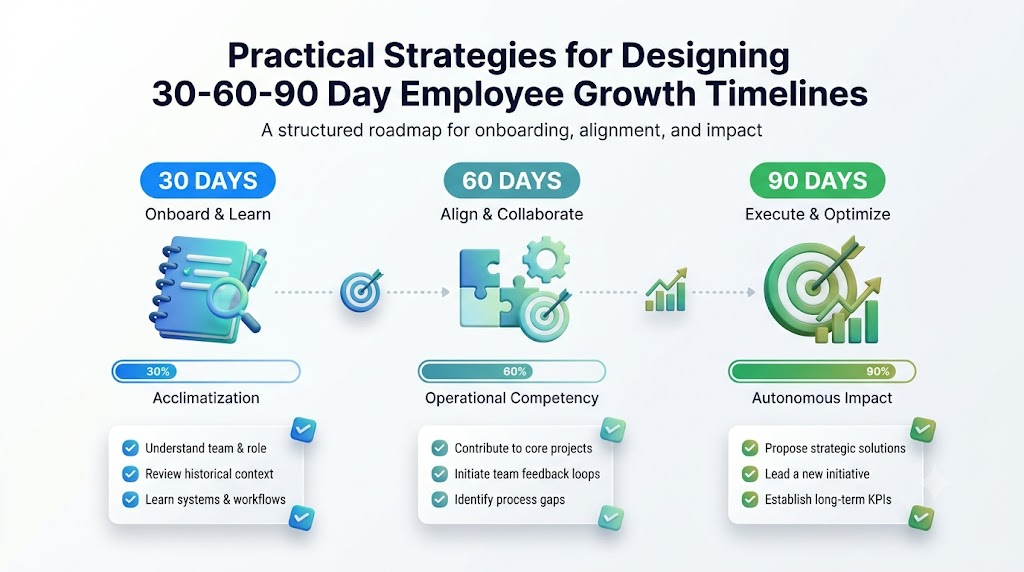
The 30 60 90 Day Onboarding Plan
A 30 60 90 day onboarding plan breaks training into three bite-sized learning stages. Breaking large goals into smaller chunks keeps new employees calm and productive.
| Timeframe | Core Focus Goal | Key Action Step |
| First 30 Days | Learn company basics and core software tools | Finish basic training and shadow skilled peers |
| Next 60 Days | Tackle real work duties with less team guidance | Handle daily projects and join team discussions |
| Final 90 Days | Work fully on your own and suggest clever ideas | Lead solo tasks and hit regular output goals |
DayOneFlow tracks these check-in dates and milestones so managers give regular, helpful feedback.
Employee Confirmation Letter Generator: Record the Final Decision
A confirmation letter proves that a worker officially passed their trial period. This official paper brings deep joy and great job security to the worker. Using an employee confirmation letter generator saves HR teams hours of manual typing. The digital tool pulls approved worker details directly into standard company letter templates. Next, the department manager and HR head review the draft for complete accuracy. Once leaders click approve, the system creates the final letter for signature. DayOneFlow stores these signed confirmation papers safely inside the central employee records hub.
Real-Life Scenarios
- An incoming sales director reviews and signs her employment agreement on an airplane. The automated platform sets up her computer permissions instantly. Her equipment reaches her doorstep with pre-built credentials, making her first morning completely effortless.
- A startup founder directs eight incoming interns on a busy summer morning. Rather than sorting messy desk folders, she checks an online dashboard. She instantly spots who finished their tax forms and who needs a quick prompt.
- A warehouse manager hits his two-month milestone without any anxiety. His director gets an automated calendar ping to book their progress discussion. Together, they review early accomplishments and establish clear expectations for month three.
- A regional retailer wraps up a cashier’s trial review smoothly after ninety days. The people operations specialist selects an approved template and builds a formal confirmation document. The employee signs the digital document that same afternoon.
Common Mistakes to Avoid
- Handing out massive paper packets on day one: Drowning new hires in physical paperwork creates unnecessary fatigue. Build an online portal so people submit key forms from home beforehand.
- Delaying computer hardware orders: Welcoming staff to an empty desk creates awkward embarrassment. Connect equipment orders to automatic task checklists so laptops arrive before day one.
- Neglecting regular performance conversations: Silent managers leave fresh hires wondering about their progress. Schedule monthly thirty-day reminder alerts so leaders share constructive feedback frequently.
- Relying on loose paper notes: Desk notebooks and sticky notes vanish under office clutter easily. Record all onboarding tasks inside a unified digital platform for full team visibility.
- Drafting individual contracts manually: Typing contracts from scratch invites costly wage and spelling errors. Deploy verified digital templates to keep every offer accurate, standard, and legally secure.
- Overlooking trial expiration milestones: Missing trial deadlines triggers legal confusion and worker distress. Use automated tracking calendars to organize final confirmation meetings two weeks in advance.
- Excluding team members from welcome plans: Forgetting to inform existing staff creates awkward first mornings. Send automatic alerts across the department so coworkers organize a friendly welcome lunch.
- Storing confidential records casually: Keeping worker banking documents in standard email folders invites data theft. Store personal employee records behind encrypted systems with strict role permissions.
How to Choose the Right Onboarding Software
Begin by listing the specific bottlenecks that slow down your current hiring process. Choose platforms that present clean, easy screens requiring minimal staff training. Verify that the software vendor implements strict data safeguards to protect identity files. Confirm that their support team answers technical questions quickly when issues arise. Compare pricing tiers, examine setup timelines, and request an interactive software demonstration. DayOneFlow fits growing companies that want simple tracking from offer to final confirmation. Always test your favorite features with real team members to ensure the tool fits.
Frequently Asked Questions
1. What does employee onboarding software do for businesses?
Digital onboarding tools coordinate every step needed to settle fresh talent into an organization. The software delivers digital employment contracts, gathers tax forms, and schedules setup duties for IT specialists. It alerts managers about upcoming review meetings. Centralizing these duties cuts out physical clutter, saves time, and helps new staff hit the ground running.
2. How does preboarding help a new worker before day one?
Early preboarding steps allow individuals to complete legal paperwork peacefully before their official start date arrives. They read company guidelines, submit identity records, and test their new work equipment early. Because boring paperwork finishes beforehand, their first working day feels refreshing. New hires can spend their energy connecting with colleagues instead of filling out payroll sheets.
3. Can small companies use onboarding software easily?
Growing businesses gain massive advantages from streamlined onboarding platforms. Small teams rarely have dedicated personnel departments, forcing founders to manage multiple responsibilities simultaneously. Software acts like a reliable extra assistant by arranging duties, dispatching reminders, and securing signed contracts. Clear controls allow teams to use these tools without advanced technical expertise.
4. What is a 30 60 90 day onboarding plan?
This structured blueprint divides an employee’s first quarter into three manageable learning phases. Month one focuses on absorbing core tools, daily operations, and office norms. Month two introduces active project work under light supervision. Month three challenges the worker to drive projects independently. This staged approach builds confidence, builds capability, and provides complete direction.
5. Why should managers track employee probation periods online?
Trial periods allow companies and workers to evaluate mutual compatibility before making long-term commitments. Digital trackers prevent leaders from overlooking mandatory review deadlines. The platform prompts supervisors to hold honest discussions, note areas for improvement, and preserve feedback. Maintaining objective records supports fair treatment, protects legal standing, and keeps decisions transparent.
6. How does an employee onboarding portal protect personal privacy?
Modern portals protect sensitive information using strong passwords, encryption, and strict role controls. This setup ensures incoming employees see only their private documents, job offers, and assigned tasks. Managers monitor project progress without gaining unauthorized access to personal bank numbers. Housing forms within a protected database shields private records from data breaches.
7. What makes a good new hire onboarding checklist?
Effective checklists convert large, vague goals into tiny, concrete tasks. Each individual item names an accountable owner, an explicit deadline, and clear instructions. It outlines duties for HR staff, technical administrators, line managers, and incoming employees alike. Flexible checklists easily adapt to different job roles, guaranteeing each worker receives customized setup support.
8. How does workflow automation reduce everyday HR stress?
Automated platforms execute routine administrative tasks like dispatching reminder notifications and assigning setup duties. When an applicant signs their contract, the system automatically instructs technical teams to configure network logins. It pings leaders before trial milestones elapse. Automating repetitive chores frees HR professionals to focus on mentoring talent, teaching skills, and building culture.
9. Why are digital confirmation letters better than paper letters?
Pre-approved digital templates draw verified worker details directly from the core employee database. This automated method eliminates embarrassing misspellings, inaccurate compensation rates, and mismatched titles. Supervisors and department leaders inspect and sign the draft online within minutes. The finalized document archives straight into the employee’s permanent record for instant access.
10. Can new employees complete onboarding tasks on mobile phones?
Responsive onboarding systems run seamlessly across mobile phones and tablets. Fresh hires can review safety handbooks, submit personal details, and upload identification photos using their camera. This mobile accessibility removes unnecessary delays. Team members can complete their preliminary steps from anywhere without requiring a desktop computer or home scanner.
11. What is the difference between onboarding and simple orientation?
Orientation represents a brief, introductory event focused on office facilities, emergency exits, and direct deposit forms. Onboarding describes an extensive developmental journey extending over several months. It supports candidates from initial job offers through hands-on coaching, performance check-ins, and formal confirmation. It prioritizes durable skills, genuine relationships, and career advancement.
12. How does DayOneFlow help companies manage new hires?
DayOneFlow combines offer creation, preboarding tasks, custom checklists, and trial tracking within a single interface. It provides secure portals for workers, automated reminders for leaders, and quick letter templates for HR teams. Using these organized tools, growing companies gain clear visibility over every hiring step. It turns stressful onboarding into a smooth, structured, and friendly experience.
Conclusion
Structured welcoming procedures transform nervous starters into capable, self-assured contributors. Clear checklists, visible milestones, and frequent coaching remove uncertainty from an employee’s first morning. Modern employee onboarding software eliminates frustrating paperwork so leadership teams can focus on people. DayOneFlow delivers an organized, easy environment to shepherd workers from their initial offer to final confirmation. Examine your current hiring routines and discover how digital tools can enhance your workplace. Investing in a welcoming onboarding journey empowers your entire organization to thrive together.
